
Salt Lake City Public Library
Salt Lake City Public LibraryLibraries & Demo
4.527.00 Reviews
- Version
- 2026.08.19
- Installs
- 10.00K
- Age Rating
- Teen
Screenshots
Our Review of Salt Lake City Public Library
 Analysis by Appyee
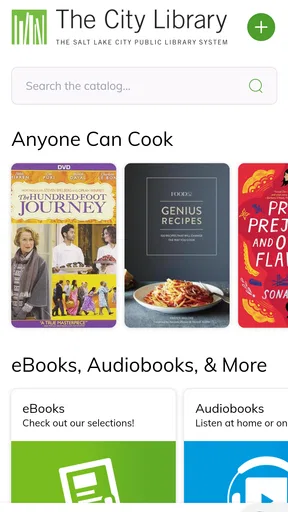
I approached Salt Lake City Public Library as a practical library companion rather than a general reading app. Its purpose is straightforward: help people browse The City Library catalog and reach its Digital Library from a phone. That focus matters because a public-library app should earn trust through clarity and usefulness, not through a crowded collection of extras. In my experience, the strongest reason to install it is the chance to begin a library search wherever I happen to be, then decide whether a physical or digital option fits my plans.
The app comes from Salt Lake City Public Library, and it sits in the Libraries & Demo section. It is free, carries a Teen content rating, and has reached over ten thousand installs. Those details make it easy to see its intended audience: local library users who want a convenient mobile doorway to library resources, rather than people looking for a standalone commercial ebook service.
How the library app feels in everyday use
The first useful distinction is between discovery and ownership. A catalog app is mainly a place to look for material, understand what the library offers, and move toward borrowing or digital access. It is not automatically a replacement for every reading, audiobook, or media app on a phone. I would install it when I regularly use The City Library, especially if I often remember a title while away from a computer.
A realistic example is a weekend trip to the library. Before leaving home, I can search for a novel, check whether the library has a digital route available, and avoid making the journey based on a vague memory of seeing it on a shelf. The same workflow is useful when a child asks for a particular book, when I am building a reading list, or when a book-club selection suddenly becomes urgent. The value is not flashy; it is the reduction of small bits of friction between “I want this title” and “I know what to do next.”
The most important strength is focused access to a local collection. A broad web search may show every edition, retailer, review, and unrelated result, while this app is relevant to the holdings and digital resources connected with The City Library. That narrower scope can save time for residents who already know where they intend to borrow.
Its current version is 2026.08.19, and the app supports Android devices running version 6.0 or later. That broad operating-system requirement should make it approachable for people who keep an older phone, although day-to-day comfort will still depend on the handset and Android interface. I would check the app’s behavior on the device I actually use rather than assuming that a newer version number guarantees a perfect experience everywhere.
What I would use it for first
My first test would be a title search with an intentionally imperfect memory. Instead of searching only an exact book name, I would try an author, a distinctive word, or a subject and then inspect the results carefully. This is a better way to judge a library catalog than searching for one famous title because it reveals whether the app supports real discovery. It also helps avoid a common mistake: treating the first result as the only relevant edition or format.
I would then compare the physical catalog result with the Digital Library route. That comparison is one of the app’s more useful practical roles. A physical copy may suit someone who prefers paper, while a digital option may be better for an evening when visiting a branch is inconvenient. The app’s value increases when I use it to make that choice before I commit time to travel or wait for a particular format.
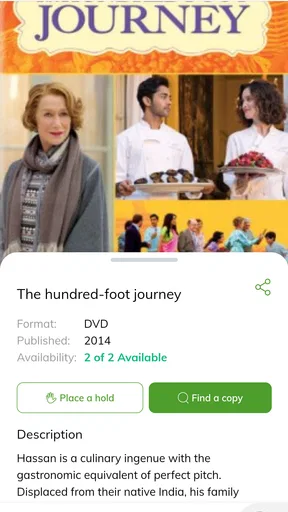
Another worthwhile workflow is to search before a planned visit, not after arriving. I can prepare a short list at home, note the titles that look promising, and use the app as a reference while in the library. This is especially helpful for readers who browse with a purpose, such as finding large-print material, continuing an author series, or locating a subject for school or work. I would still verify the format and availability shown in the app at the moment I need it, because library collections change.
The app can also serve less frequent users. Someone who visits Salt Lake City occasionally may not want another complex service on their phone, but a free catalog tool can be worthwhile during a specific search. In that situation, I would keep expectations modest: use it to find and evaluate library resources, then follow the library’s normal borrowing or digital-access process.
Trust begins with the app’s limited purpose
For a library application, trust is closely tied to whether the experience feels proportionate to the task. I prefer a tool that stays centered on catalog browsing and Digital Library access over one that tries to imitate a social network, shopping platform, or entertainment portal. This app’s stated role gives it a sensible boundary, and that boundary makes the service easier to understand.
There is also a useful difference between trusting the institution and blindly trusting every mobile screen. Salt Lake City Public Library is the named developer, which gives the app a clear connection to the library it represents. Even so, I would read each screen before continuing, particularly when a search leads into a separate digital service or asks me to sign in. A recognizable developer is reassuring context, but it is not a reason to skip ordinary attention.
When an app is connected to a library account, I think about practical privacy moments rather than making broad assumptions. Searching for a sensitive subject, signing in on a shared device, or leaving a session open at home can all change the privacy picture. I would avoid entering account details on a phone I do not control, and I would sign out when using a borrowed or family-shared device if the app presents that option.
I also pay attention to visible choices. If a screen asks for permission, I want to know what action triggered the request and whether the app can still perform basic catalog browsing without granting it. If a digital-library handoff opens another service, I treat that transition as a new point of attention rather than assuming every screen has identical controls. This is not a criticism of the app; it is a sensible habit whenever a local library service connects with digital content.
Account control and moments that deserve care
A person deciding whether to use the app will reasonably wonder whether an account is required for every task. I would approach it in stages: begin with browsing, see which information is available without signing in, and only provide library-account details when a borrowing or personalized action genuinely requires them. That approach preserves user choice and prevents unnecessary account entry during a simple search.
If I did sign in, I would check the account area for the actions I expect to manage, such as reviewing personal activity or handling a borrowing task. I would not assume that every library-account function is represented in exactly the same way as on the library website. When an action feels missing or unclear, the website or direct library assistance may be the better route. A mobile app should be convenient, but it should not become the only place where I feel forced to solve an account problem.
Shared devices deserve a separate workflow. On a family tablet, I would make sure the next person cannot casually continue from my session. On a work or school phone, I would avoid saving credentials unless the device’s security settings and ownership make that reasonable. These are small steps, but they matter more than a polished interface when the app is connected to personal borrowing information.
Search behavior can also be data-sensitive. I would remember that a search for a medical, legal, financial, or personal topic may reveal something about my interests to anyone who later sees the device. I would clear the search context when appropriate and avoid using a public screen for private research. The app’s library purpose makes these searches useful, but usefulness does not remove the need for discretion.
Digital access creates another practical distinction. Finding a digital title in the library app does not necessarily mean the entire reading or listening experience happens inside the same interface. If the app sends me to a Digital Library service, I would read the destination’s sign-in and permission screens separately. That is the right place to check what I am agreeing to, rather than assuming that a library-branded starting point makes every downstream choice identical.
Where it beats ordinary alternatives
The usual alternative is a browser bookmark to the library website. A browser can be more flexible, especially when I need help pages, account support, or several library services at once. It may also be preferable on a computer, where multiple tabs make comparison easier. The app’s advantage is convenience on a phone: it gives the library search a dedicated place and reduces the temptation to begin with a broad web search.
Another alternative is a commercial bookstore or reading app. Those services are often better for purchasing, tracking a personal collection, reading reviews, or managing books that I own. They are not designed around Salt Lake City library discovery. If my goal is to buy a title or organize a private ebook library, I would choose the specialized commercial tool. If my goal is to see what The City Library can provide, this local app is the more direct starting point.
General reading platforms can also be stronger for recommendations. They may offer social lists, personalized suggestions, or detailed reading statistics. I would not choose this library app expecting those features. Its trade-off is clear: less emphasis on a personal reading identity, more emphasis on reaching the local catalog and Digital Library. For many library members, that is a sensible trade rather than a weakness.
The app is less compelling for someone who does not use The City Library, lives outside its service area, or wants one universal catalog covering many unrelated library systems. In those cases, a broader discovery service or the relevant local library’s own site would be a better fit. Installing a local catalog app only makes sense when the underlying collection and account relationship are useful to me.
Small habits that make the experience better
I would search by both title and author when a result matters. This simple cross-check helps catch alternate editions and avoids assuming that one result represents every format. I would also inspect the details before planning a trip, because a promising title may be digital rather than physical, or may require a different next step than I expected.
For series reading, I would search the author and then work through the available titles instead of relying on memory. This is a particularly useful library workflow because a series may be split between physical and digital formats. I would record the order outside the app if needed, then use the catalog to confirm each next title. That turns the app from a one-off search box into a lightweight planning tool.
For school or work research, I would use the app to identify library material, then evaluate the item itself and any supporting information carefully. A catalog result is a route to a resource, not automatically a complete answer. I would save the useful title details in my notes and return to the app when I need to check another format or related subject.
Notifications and account prompts deserve the same restraint as permissions. I would enable only the alerts I find useful, if the app offers choices, and I would revisit those settings when my borrowing habits change. A library tool should support my schedule, not create a stream of reminders that I no longer need. Visible controls are more valuable than automatic convenience when the account is personal.
What the rating suggests, and what it does not
The app has a 4.5 average from over sixty ratings, with more than twenty written reviews. That is a positive signal, especially for a focused public-library utility, but I would interpret it in context. A catalog app serves a narrower audience than a mainstream social or entertainment app, so the most useful question is whether its workflow matches my library needs.
The free price removes the main barrier to trying it. I can test catalog browsing without making a purchase decision, then keep it only if it saves time. Its Teen rating also means families should still use ordinary judgment around the material discovered through a library catalog. The rating describes the app’s content classification, not a guarantee that every book or digital item surfaced will suit every reader.
One limitation I would keep in mind is dependence on the library ecosystem. The app can be convenient without being fully self-sufficient. If a title search raises a question about borrowing rules, account status, branch service, or digital access, I may still need the library website or staff assistance. That is not a failure; it is the natural boundary between a mobile catalog and the broader institution.
Another limitation is that a phone is not always the best research workspace. For a quick search, it is excellent. For comparing many titles, reading long descriptions, or managing several account tasks, a larger browser screen may be more comfortable. I would use the app for speed and portability, then switch tools when the task becomes more involved.
My recommendation for Salt Lake City library users
I would recommend Salt Lake City Public Library to people who already use The City Library and want a direct mobile way to browse its catalog and Digital Library. It is especially suitable for spontaneous searches, pre-visit planning, series tracking, and checking whether a digital route may be more convenient than a branch visit. The free installation makes that recommendation easy to test rather than a commitment.
I would skip it if I need a universal book database, a polished personal reading tracker, a retail storefront, or a full research environment on a large screen. I would also choose the library website when I need broader account help or institutional information. In those situations, the alternative is not necessarily better overall; it is simply better matched to the task.
My cautious verdict is favorable. The app’s trust case comes from its clear local purpose, identifiable developer, and the user’s ability to approach account and digital-service transitions deliberately. I would not treat a library app as something to install and operate mindlessly, especially on a shared device, but I also do not see a reason to overcomplicate its role. Use it as a focused doorway to Salt Lake City library resources, check the choices presented on each sign-in or handoff screen, and move to the website when the task outgrows mobile browsing.
For me, that is the right balance: convenient enough for everyday discovery, limited enough to understand, and honest about where a dedicated catalog tool ends and the wider library service begins.
Verdict
Strengths of Salt Lake City Public Library
- Free access to e-books, audiobooks, and digital magazines
- Library card registration is available through the app
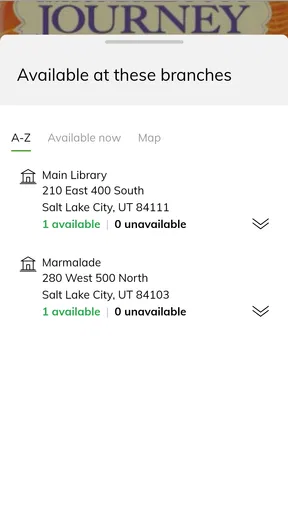
- Searches multiple branches and library collections in one place
- Renew eligible loans without visiting a library
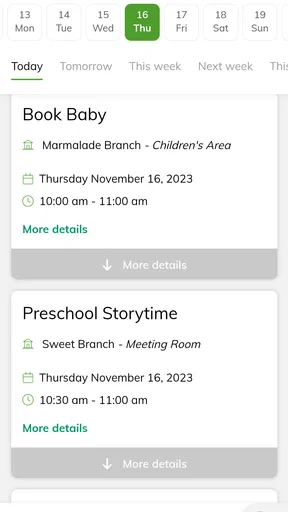
- Useful event listings for classes, talks, and community activities
Limitations of Salt Lake City Public Library
- Some digital titles may have long waitlists or limited copies
- Certain features require an active Salt Lake City library card
- Branch hours and services can vary by location
- The interface may feel dated compared with newer library apps
- Requires internet access for most browsing and account features
Similar Picks in This Category
View All
PGT: GFX, Launcher & Optimizer
Trilokia Inc.4.5

AusweisApp Bund
Governikus Service GmbH3.7

Cardboard
Google LLC3.2

Gamers GLTool with Game Tuner
Trilokia Inc.4.5

Multi Web Chat - Read Secretly
World Scan & Cleaner3.8

App Cloner Premium & Add-ons
App Listo1.9
Frequently Asked Questions
What is the Salt Lake City Public Library app used for?
The Salt Lake City Public Library app gives cardholders a convenient way to access library services from an Android or iOS device. After signing in, you can browse the catalog, search for books and other materials, place holds, review checked-out items, renew eligible loans, and manage account information. It is especially useful when you want to interact with the library without visiting a branch in person.
Do I need a Salt Lake City Public Library card to use the app?
Most account-based features require a valid Salt Lake City Public Library card and the associated account credentials. Without signing in, you may still be able to browse the catalog or view general library information, depending on the current app setup. If you do not have a card, check the library’s official website or contact a branch to learn whether you qualify and how to apply.
Can I borrow or access digital books and other online content through the app?
The app may help you discover digital books, audiobooks, magazines, databases, and other electronic resources available through the library. Availability can depend on the library’s current services, licensing agreements, and the specific platform used for digital lending. Some titles may open in a separate service or require an additional app, so the experience may differ from borrowing a physical item.
Can I renew materials and manage holds in the Salt Lake City Public Library app?
Yes, the app is designed to make routine account management easier. You can generally view items currently checked out, see due dates, renew eligible materials, and review or place holds. Renewals are not guaranteed because restrictions may apply when another patron has requested an item, a renewal limit has been reached, or the material type has different lending rules.
Is the Salt Lake City Public Library app free and safe to download?
The official app should be free to download, although normal mobile data charges may apply when using it over cellular networks. For safety, download it only from the official Google Play Store or Apple App Store and verify that the publisher matches the Salt Lake City Public Library. Avoid unofficial copies, and review requested permissions before installation. Keep the app updated for security and compatibility improvements.
